PortablePowerStations: Runtime vs Cost
Lead Author
Published
Views:
Choosing among portablepowerstations is not just about finding the biggest battery or the lowest price—it is about understanding how long your devices will actually run and what each watt-hour costs you. Whether you are preparing for outages, camping, working remotely, or powering essential gear on the move, runtime and cost determine real-world value. This guide breaks down the key factors consumers should compare before buying, helping you match performance, budget, and reliability with confidence.
For consumers, the buying decision often starts with a simple question: “How many hours will it power my devices?” The better question is more precise: “How many usable watt-hours can I get, at what output level, and at what total ownership cost?” That approach reflects how engineering teams evaluate power systems in aviation, rail, logistics, and other mobility sectors: capacity matters, but reliability, safety margins, conversion losses, and operating conditions matter just as much.
Understanding Runtime: Capacity Is Only the Starting Point
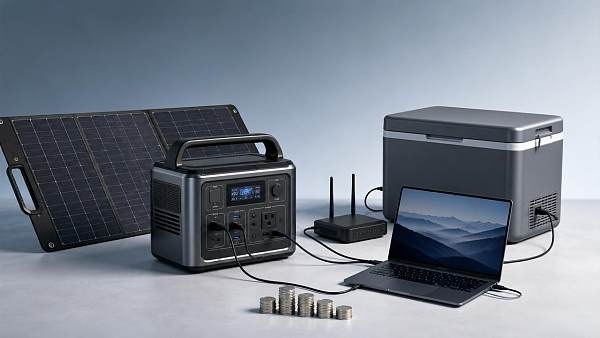
Runtime is the most searched feature of portablepowerstations, yet it is also the most misunderstood. A unit rated at 1,000Wh does not always deliver 1,000Wh to your laptop, refrigerator, CPAP machine, or camera kit. In real use, inverter losses, battery protection limits, temperature, device startup surge, and charging behavior reduce usable energy.
How to estimate device runtime
The basic formula is simple: usable watt-hours divided by device watts equals estimated hours. If a station provides about 850 usable Wh after losses and your device draws 50W, expected runtime is roughly 17 hours. For AC devices, assuming 10%–20% conversion loss is realistic.
A refrigerator may average 60W–150W but surge above 600W when the compressor starts. A laptop may draw 30W–90W depending on workload. A CPAP machine may use 30W–80W, but a heated humidifier can double consumption. These differences turn advertised runtime into a range, not a fixed promise.
Quick runtime calculation steps
- List each device and its running wattage, not only its charger rating.
- Multiply watts by planned operating hours to estimate watt-hour demand.
- Add 10%–25% reserve for inverter loss, surge, and colder conditions.
- Check whether the station’s continuous output and surge output meet your highest load.
- Compare the result with usable capacity, not just headline capacity.
This table gives practical runtime expectations for common consumer scenarios. Figures are typical ranges, not guarantees, because actual performance depends on device efficiency, ambient temperature, and battery management settings.
The key conclusion is that portablepowerstations should be sized around your daily energy budget, not a single appliance name. For a 24-hour outage plan, many households need 500Wh–1,500Wh for communications, lighting, medical support, and refrigeration rotation, while heavier loads require larger systems or staged use.
Cost per Watt-Hour: Finding Real Value Beyond the Sticker Price
Cost comparison should begin with dollars per watt-hour, but it should not end there. A 300Wh station at a low purchase price can be expensive per usable Wh, while a 2,000Wh system may offer better energy economics but exceed your portability needs. The goal is balanced value.
The practical cost formula
Divide purchase price by rated Wh to get a quick cost-per-Wh estimate. For example, a 1,000Wh unit priced at $800 equals $0.80 per rated Wh. If usable energy after losses is closer to 850Wh, the effective figure becomes about $0.94 per usable Wh.
Consumers should also account for cycle life. A battery rated for 3,000 cycles to 80% capacity may cost more initially than one rated for 800 cycles, but the long-term energy cost can be lower if you use it weekly for remote work, field hobbies, or backup readiness.
Cost factors that change the purchase decision
- Battery chemistry: LiFePO4 often supports 2,000–4,000 cycles, while many NMC packs are lighter but commonly rated lower.
- Output architecture: Higher inverter ratings, such as 1,800W–3,000W, increase cost but support more appliances.
- Recharge speed: AC charging from 0% to 80% in 1–2 hours is convenient but may add cost.
- Solar input: A 400W–1,200W solar input range improves resilience during multi-day outages.
- Warranty and service: A 3-year to 5-year warranty can matter more than a small upfront discount.
Aviation and advanced transportation engineering place high value on lifecycle evaluation because downtime has measurable consequences. For consumer portablepowerstations, the same principle applies at a smaller scale: a lower price is attractive only if capacity, safety, and durability still match the mission.
The following comparison helps frame budget expectations across common capacity tiers. Actual prices vary by brand, battery chemistry, ports, surge rating, and included accessories.
The strongest value usually appears when capacity, inverter output, recharge method, and expected use frequency align. A compact unit used twice a year may be sensible; a frequently used power hub should be judged over 3–5 years of service, not one sale price.
Matching PortablePowerStations to Real Consumer Scenarios
A station that performs well for a weekend photographer may fail as a home backup unit. Another model that supports a microwave may be too heavy for hiking or small-car travel. Choosing portablepowerstations is therefore a scenario-matching exercise with clear trade-offs.
Emergency backup at home
For power outages, prioritize essentials: communication, lighting, medical devices, refrigeration cycles, and small cooking support. Many consumers benefit from a 1,000Wh–2,000Wh station with at least 1,000W continuous AC output. If refrigeration is critical, verify surge capacity before purchase.
Solar compatibility becomes important during outages lasting more than 24 hours. A 200W solar panel may restore roughly 600Wh–1,000Wh on a good day, while 400W can improve recovery speed. Weather, panel angle, and shade can reduce production substantially.
Camping, overlanding, and travel
For camping, weight and charging flexibility matter as much as capacity. A 500Wh–1,000Wh station can run lights, phones, cameras, fans, and a small cooler. If the unit weighs more than 40 lb, portability may become a real limitation.
Vehicle charging is useful but slow unless the station supports high-watt DC input. Some car sockets provide only 100W–150W, meaning a 1,000Wh station may need 7–10 hours to recover significantly. Plan energy use before reaching the campsite.
Remote work and mobile productivity
Remote workers often overbuy capacity and undercheck ports. A station with 100W USB-C PD, multiple DC outputs, and quiet operation can be more useful than a larger unit that forces every device through AC. Noise below typical conversation level is valuable indoors.
Scenario-based selection checklist
- For outages: choose enough capacity for 12–48 hours of essential loads.
- For camping: keep weight, handle design, and solar input in the top 3 priorities.
- For medical devices: confirm output stability, runtime, and manufacturer device compatibility.
- For tools: check continuous wattage, surge rating, and cooling behavior under repeated starts.
- For apartments: consider noise, indoor-safe battery chemistry, and storage temperature limits.
The best model is not the largest one; it is the one that meets your highest-priority load for the required duration with a safety reserve of about 20%. This same risk-margin thinking is used in transportation systems where power continuity supports safety, communication, and operational confidence.
Safety, Reliability, and Lifecycle Considerations
Runtime and cost are important, but they should never override safety. Portablepowerstations combine high-density batteries, inverters, charge controllers, thermal management, and protective electronics. A reliable product should communicate limits clearly and shut down safely when overloaded or overheated.
Battery chemistry and cycle life
LiFePO4 batteries are widely valued for thermal stability and long cycle life, often in the 2,000–4,000 cycle range depending on design. NMC batteries can offer higher energy density and lower weight, which may suit users who prioritize portability over maximum cycle count.
Cycle ratings are typically measured to a remaining capacity threshold, often 80%. That means the station should still operate after many cycles, but with reduced runtime. Consumers using a unit daily should weigh cycle life more heavily than occasional emergency buyers.
Thermal performance and storage
Most batteries perform best in moderate conditions, roughly 10°C–30°C. Cold weather can reduce available capacity, while heat accelerates aging. Avoid storing a station in a hot vehicle for long periods, especially above 40°C, because long-term battery health can suffer.
Reliability checks before buying
- Confirm rated Wh, usable output expectations, and battery chemistry.
- Review continuous AC output, surge output, and overload behavior.
- Check available ports, including USB-C PD, DC barrel, car socket, and AC outlets.
- Compare recharge methods: AC, solar, vehicle, and combined input.
- Look for clear warranty terms, service access, and replacement accessory availability.
- Read operating temperature limits before planning winter or desert use.
A disciplined checklist prevents expensive mismatch. It also reflects a broader engineering culture: whether evaluating eVTOL control systems, high-speed rail signaling, or consumer energy storage, the decision should connect rated performance to real operating conditions.
Common Mistakes That Increase Cost or Reduce Runtime
Many poor buying decisions come from focusing on one specification and ignoring the rest. A station may advertise high capacity but recharge slowly. Another may be affordable but lack enough surge output. Understanding these mistakes can save hundreds of dollars and many hours of frustration.
Mistake 1: Comparing rated capacity without usable capacity
Rated capacity is measured inside the battery pack. Devices receive energy after conversion, protection circuitry, cable losses, and inverter operation. For AC appliances, usable energy may be 80%–90% of rated capacity under typical conditions, and sometimes lower at very high loads.
Mistake 2: Ignoring startup surge
Motors, compressors, pumps, and some tools draw a brief surge that may be 2–5 times their running wattage. If the inverter cannot handle that spike, the station may shut down even though the running wattage looks acceptable on paper.
Mistake 3: Buying capacity without a recharge plan
A large battery is only useful if you can recharge it in time. If a station takes 8–12 hours on AC or cannot accept enough solar input, it may be less practical during repeated outages. Check 0%–80% recharge time, not only 0%–100%.
Practical rule of thumb
For occasional phone and laptop backup, 300Wh–700Wh may be enough. For mixed home essentials, 1,000Wh–2,000Wh is more realistic. For multi-day backup or high-watt appliances, consider expandable systems above 2,000Wh with solar support and clear load management.
A Smarter Buying Framework for Consumers
The most effective way to compare portablepowerstations is to build a short decision matrix before shopping. This reduces the influence of discounts, inflated runtime claims, or oversized products that look impressive but do not solve your specific problem.
Five-step evaluation process
- Define your top 3 use cases, such as outage backup, camping, or remote work.
- Calculate total watt-hours needed for each use case over 12, 24, or 48 hours.
- Add a 20% reserve for conversion loss, cold weather, battery aging, and unexpected loads.
- Set limits for weight, budget, recharge speed, and noise before comparing models.
- Choose the unit with the best fit across capacity, output, lifecycle, and service support.
Consumers who approach the purchase this way usually avoid two extremes: underbuying a small station that cannot support essentials, or overbuying an expensive unit that remains half-used. Both outcomes distort cost per hour of useful power.
When expert guidance is worth it
If your plan includes medical equipment, refrigerated medicine, remote field work, or critical communications, it is wise to verify load calculations before purchase. Even a 10W–30W error can become significant over 24–48 hours, especially in bad weather or repeated outages.
G-AIT’s broader perspective on advanced mobility, safety benchmarking, and mission-critical power continuity supports a practical consumer message: energy decisions should be evidence-based. The same thinking that guides aerospace and transportation systems can help households choose safer, better-sized backup power.
Portablepowerstations deliver the best value when runtime, cost per usable watt-hour, output capability, recharge strategy, and lifecycle expectations are considered together. A good choice is not simply cheap or large; it is correctly matched to the devices, duration, and risks that matter most to you.
If you are comparing options for home resilience, outdoor travel, remote work, or essential equipment backup, start with your load list and operating hours. For tailored guidance, consult product details, request a scenario-based comparison, or explore more solutions that fit your capacity, budget, and reliability requirements.
Article Categories
SYSTEM_ALERT_URGENT
Q3 SYMPOSIUM ON ORBITAL DYNAMICS
Registration for the Orbital Aerospace technical committee is now open. Node access required.
Taglist:
Recent Articles
![]() Oct 27, 2026FAA Certifies Boeing 737 MAX 10 After Years of DelaysFAA Certifies Boeing 737 MAX 10 After Years of Delays
Oct 27, 2026FAA Certifies Boeing 737 MAX 10 After Years of DelaysFAA Certifies Boeing 737 MAX 10 After Years of Delays Oct 27, 2026Can an intermodal connectivity platform reduce rail handoff delays?Can an intermodal connectivity platform reduce rail handoff delays?
![]() Oct 26, 2026Chery Unveils Global Smart Mobility Strategy Targeting Robotaxis and eVTOLsChery Unveils Global Smart Mobility Strategy Targeting Robotaxis and eVTOLs
Oct 26, 2026Chery Unveils Global Smart Mobility Strategy Targeting Robotaxis and eVTOLsChery Unveils Global Smart Mobility Strategy Targeting Robotaxis and eVTOLs Oct 26, 2026How to evaluate avionics for helicopters used in IFR operationsHow to evaluate avionics for helicopters used in IFR operations
![]() Oct 25, 2026Ukraine’s Defence Minister Says SpaceX Satellite Services Restored After Speed RestrictionsUkraine’s Defence Minister Says SpaceX Satellite Services Restored After Speed Restrictions
Oct 25, 2026Ukraine’s Defence Minister Says SpaceX Satellite Services Restored After Speed RestrictionsUkraine’s Defence Minister Says SpaceX Satellite Services Restored After Speed Restrictions Oct 25, 2026How satellite infrastructure for IoT affects sensor reporting delaysHow satellite infrastructure for IoT affects sensor reporting delays
![]() Oct 24, 2026China Successfully Launches Yaogan 50-03 SatelliteChina Successfully Launches Yaogan 50-03 Satellite
Oct 24, 2026China Successfully Launches Yaogan 50-03 SatelliteChina Successfully Launches Yaogan 50-03 Satellite Oct 24, 2026How gradients affect traction power needs in high-speed rolling stockHow gradients affect traction power needs in high-speed rolling stock
![]() Oct 23, 2026FAA Proposes Checks on Nearly 2,000 Boeing 737NGs Over Loss-of-Control RiskFAA Proposes Checks on Nearly 2,000 Boeing 737NGs Over Loss-of-Control Risk
Oct 23, 2026FAA Proposes Checks on Nearly 2,000 Boeing 737NGs Over Loss-of-Control RiskFAA Proposes Checks on Nearly 2,000 Boeing 737NGs Over Loss-of-Control Risk Oct 23, 2026How fuel choice affects specific impulse in liquid oxygen propulsionHow fuel choice affects specific impulse in liquid oxygen propulsion
![]() Oct 22, 2026QuantumScape Plans 100 MWh Solid-State Battery Line Targeting Aerospace and Other MarketsQuantumScape Plans 100 MWh Solid-State Battery Line Targeting Aerospace and Other Markets
Oct 22, 2026QuantumScape Plans 100 MWh Solid-State Battery Line Targeting Aerospace and Other MarketsQuantumScape Plans 100 MWh Solid-State Battery Line Targeting Aerospace and Other Markets Oct 22, 2026How tank size limits hydrogen aircraft range on regional flightsHow tank size limits hydrogen aircraft range on regional flights
![]() Oct 21, 2026FAA Certifies Boeing 737-10, Clearing Regulatory Hurdle for DeliveriesFAA Certifies Boeing 737-10, Clearing Regulatory Hurdle for Deliveries
Oct 21, 2026FAA Certifies Boeing 737-10, Clearing Regulatory Hurdle for DeliveriesFAA Certifies Boeing 737-10, Clearing Regulatory Hurdle for Deliveries Oct 21, 2026How are electric vertical takeoff aircraft certified in the US?How are electric vertical takeoff aircraft certified in the US?
![]() Oct 20, 2026Ohio Department of Transportation Releases Three-Year Advanced Air Mobility Action PlanOhio Department of Transportation Releases Three-Year Advanced Air Mobility Action Plan
Oct 20, 2026Ohio Department of Transportation Releases Three-Year Advanced Air Mobility Action PlanOhio Department of Transportation Releases Three-Year Advanced Air Mobility Action Plan Oct 20, 2026How does magnetic flux density in tesla affect maglev lift force?How does magnetic flux density in tesla affect maglev lift force?
![]() Oct 19, 2026ZeroAvia Completes Key Ground Tests of ZA600 Hydrogen Fuel Cell PowertrainZeroAvia Completes Key Ground Tests of ZA600 Hydrogen Fuel Cell Powertrain
Oct 19, 2026ZeroAvia Completes Key Ground Tests of ZA600 Hydrogen Fuel Cell PowertrainZeroAvia Completes Key Ground Tests of ZA600 Hydrogen Fuel Cell Powertrain Oct 19, 2026How spacecraft integration affects advanced propulsion costsHow spacecraft integration affects advanced propulsion costs
 Oct 18, 2026How chilldown prevents cavitation in cryogenic engine systemsHow chilldown prevents cavitation in cryogenic engine systems
 Oct 17, 2026How explainability affects algorithmic trust in AI flight systemsHow explainability affects algorithmic trust in AI flight systems
 Oct 16, 2026How to evaluate transportation technology for Middle East heatHow to evaluate transportation technology for Middle East heat
 Oct 15, 2026How common-cause failures defeat redundancy logic in European avionicsHow common-cause failures defeat redundancy logic in European avionics
 Oct 14, 2026How DO-160 applies to aerospace technology testing for avionicsHow DO-160 applies to aerospace technology testing for avionics
 Oct 13, 2026How fuel price volatility shapes commercial aviation cost trendsHow fuel price volatility shapes commercial aviation cost trends
 Oct 12, 2026How to qualify aerospace manufacturing components for traceabilityHow to qualify aerospace manufacturing components for traceability
 Oct 11, 2026Which certification hurdles are slowing hydrogen aviation in Europe?Which certification hurdles are slowing hydrogen aviation in Europe?
 Oct 10, 2026What evidence should a magnetic gap stability supplier provide?What evidence should a magnetic gap stability supplier provide?
 Oct 09, 2026Which ISO standards matter when qualifying industrial technology suppliers?Which ISO standards matter when qualifying industrial technology suppliers?
 Oct 08, 2026When does reusability actually lower launch vehicle costs?When does reusability actually lower launch vehicle costs?
 Oct 07, 2026Where to find reliable product knowledge resources in the Middle EastWhere to find reliable product knowledge resources in the Middle East
 Oct 06, 2026What drives high-speed rail systems cost per kilometer?What drives high-speed rail systems cost per kilometer?
 Oct 05, 2026When does hydrogen propulsion for UAV extend mission range enough to justify it?When does hydrogen propulsion for UAV extend mission range enough to justify it?
 Oct 04, 2026How rail systems integration reduces commissioning delaysHow rail systems integration reduces commissioning delays
 Oct 03, 2026How to evaluate an advanced propulsion manufacturer for hydrogen systemsHow to evaluate an advanced propulsion manufacturer for hydrogen systems
 Oct 02, 2026How to qualify aircraft components for OEM production approvalHow to qualify aircraft components for OEM production approval